Lumeshot: a native macOS capture tool that uploads where I tell it
Source: github.com/seitzbg/lumeshot
On Windows, ShareX does the whole loop. You capture something, mark it up, and upload it, and the link is on your clipboard before you have finished thinking about it. macOS has nothing quite like it. I wanted something native that speaks ShareX's .sxcu uploader format and points uploads at my own infrastructure instead of someone else's cloud. So I built Lumeshot.
Lumeshot is a Swift-native screenshot, annotation, upload, and screen-recording tool for macOS. It runs on Apple Silicon and needs macOS 15 or newer. It sits in the menu bar and captures with ScreenCaptureKit. It reads the same .sxcu configs ShareX uses. It builds with Swift Package Manager and has no Xcode project, which keeps it scriptable.
Capture and annotate
Capture works the way you would expect. Fullscreen across all displays, drag-to-select region, or hover-to-highlight window, on ⌥⇧3 / ⌥⇧4 / ⌥⇧5. Each capture runs through a save, copy, optional upload, then history pipeline. There is screen recording too on ⌥⇧6. It records with ScreenCaptureKit to MP4, with optional system audio and export to GIF on demand.
The editor is opt-in per capture. It has rectangles, ellipses, lines, arrows, and freehand; blur, pixelate, highlighter, text, and step-number badges; a non-destructive crop; and bounded undo/redo. The document stays non-destructive. It is a base image plus an ordered list of shapes. It only gets flattened through CoreGraphics at export.
Redaction that fails closed
When the point of the blur tool is to hide a password or a face, "best effort" is the wrong behaviour. So if a redaction or crop cannot be rendered for any reason, Lumeshot cancels the export and leaves the editor open. It never quietly saves the un-redacted image. It is a small amount of code and the most important behaviour in the app.
Uploaders
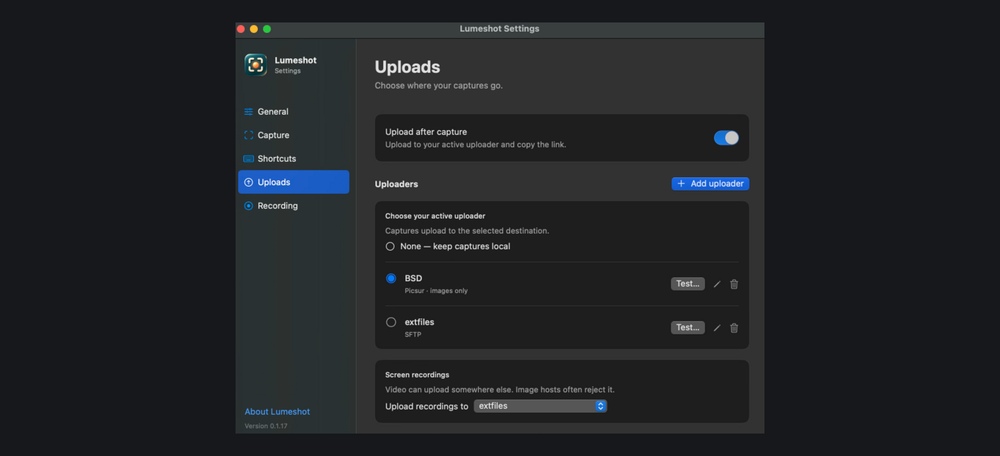
Screenshots and recordings can go to different destinations. The backend list is broad on purpose: custom .sxcu (with templating and regex/JSON URL extraction), Imgur, self-hosted Picsur, S3-compatible storage, SFTP, and FTP/FTPS. The S3 path is a hand-written SigV4 signer with no AWS SDK. It works against AWS, Cloudflare R2, MinIO, and Backblaze B2 alike. SFTP pins host keys on a trust-on-first-use basis. It records the key on first connect and checks it after that. That replaced an earlier validator that accepted anything, which a code review caught.
Secrets stay out of the plaintext settings file and live in the login Keychain. Imported .sxcu configs get a hygiene pass. The JSON body template and request URL always go to the Keychain. Header and argument keys are matched against an authorization|token|api_key|signature pattern. Upload-failure logs drop the server's response body, since it can contain signed URLs.
Testing what you cannot fake
You cannot mock an SFTP or FTP transport into telling you the truth. Key parsing, host-key pinning, TLS negotiation, and the libcurl plumbing only show up against a real server. So a companion working tree turns the old manual smoke checklists into integration tests. A Docker Compose harness starts throwaway atmoz/sftp, pure-ftpd, and nginx containers with generated keys and certs. The tests then check that the public URL the uploader returned actually serves the bytes that went up.
./up.sh                  # generate keys + cert, start the servers, print LUMESHOT_LIVE_* env
swift test --filter "LiveSFTPTransportTests|LiveFTPTransportTests"
./down.sh --clean        # stop and delete state
One packaging note in the same vein. codesign --verify passes on a bundle that cannot launch. So CI runs the built binary with --version as the real check. That exercises dynamic-library resolution, and signature verification does not.
Where it is
Lumeshot is at v0.1.17 under GPL-3.0. It ships as a Developer-ID signed, notarized, stapled .dmg that CI builds on every version tag, and Sparkle handles updates. It is at github.com/seitzbg/lumeshot. It is early and the version number says so. But it already does what I wanted. Screenshot, mark it up, and drop it on my own storage without a detour through anyone else's servers.